


Suka - Live Stream, Chat
0.00.00 Reviews
App Specs
- Version
- 1.1.4
- Updated On
- License
- Free
- Downloads
- 100,000+
- Developer
- M Yasin
- Categories
- Lifestyle
- Platform
- Android
Screenshots
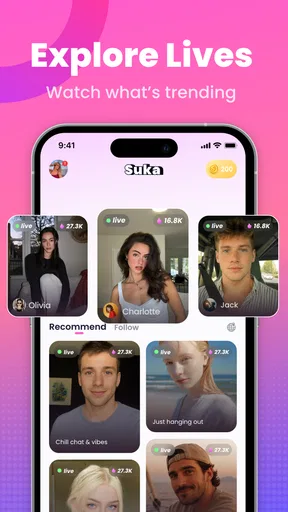
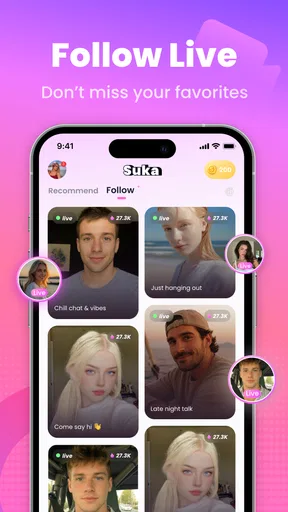

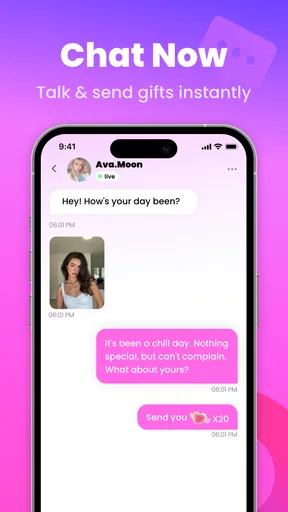
 Analysis by AppCompare
I tried Suka - Live Stream, Chat as a lifestyle app built around live shows and real-time conversation, and my first impression was that it is aimed at people who want something more immediate than ordinary social feeds. Instead of waiting for edited posts or carefully written updates, you enter a live environment where the appeal comes from being present while something is happening.
That difference matters. Suka is not simply a replacement for a messaging app, and I would not approach it expecting the same private, predictable experience as a conventional chat service. Its value depends on the energy of live interaction: finding a show that interests you, joining at the right moment, and deciding whether the conversation feels worth staying for. When that rhythm works, the app can feel more personal than scrolling through static content.
At the same time, live platforms demand more attention than passive entertainment. I found that the best experience came from using it with a clear purpose rather than opening it aimlessly. If I wanted quick social discovery, it made sense. If I needed a quiet conversation, a focused group discussion, or a completely controlled viewing experience, a more traditional alternative would usually be the better choice.
How the everyday Suka experience works
I use a simple check before settling into a live show: decide whether I’m there to listen, join the conversation, or just explore. That choice makes it easier to judge a room on its own terms and leave without feeling I need to make every visit count. The next section looks at the small setup habits that can make those visits feel more comfortable and less distracting.
Start with a simple viewing routine
The most practical way to approach Suka is to treat the live-show area as a place for short visits first. I would open the app when I had a little time, look for a currently active show, and spend a few moments judging the atmosphere before committing to a longer session. That small habit avoids one of the common problems with live platforms: staying in a room simply because you have already spent time there.
The store summary presents the app around real-time shows and real connections, and that focus is clear in how I used it. The experience is less about building a perfect profile and more about choosing where to participate. A show can be useful for casual conversation, discovering people with similar interests, or simply filling a short break with something more interactive than a standard video.
I recommend listening and observing before joining the conversation heavily. Live rooms can have their own tone, pace, and unwritten expectations. Taking a moment to understand what is happening helps you avoid interrupting a discussion or spending attention in a room that is not really suited to you. This is a small but important difference between casual users and people who get consistent value from the app.
Worth Reading Before You Choose

Flipboard Shows What News Apps Must Do Beyond the Feed

Switching to Android Auto Means Rethinking Your Driving Routine

Google Calendar Makes a Crowded Week Easier to Manage

Ludo King Makes the Most of the Minutes Between Plans

Baby Panda World Brings Quick Play to Modern Phones, but Its Game Library Feels Busy

ESPN’s Live Game View Makes Following Close Games Easier
Use it in realistic everyday situations
One scenario where I can see Suka fitting naturally is an evening when I want company but do not necessarily want to arrange a formal call. I might browse a live show, stay for a few minutes, and participate only when the conversation feels comfortable. That is less demanding than organizing a video call, while still offering more immediacy than reading comments on an ordinary social network.
It can also work during a short break when I want to discover what other people are discussing right now. However, I would avoid opening it during tasks that require concentration. Live interaction encourages checking back, reacting, and following the flow of conversation, so it can become distracting even when the original plan was only to spend a few minutes inside the app.
For someone who enjoys meeting unfamiliar people through shared interests, the format is more appealing than a static lifestyle feed. For someone who prefers conversations with known contacts, the usual messaging tools remain more efficient. Suka is strongest when the uncertainty of live discovery is part of the attraction, not when the user wants a guaranteed, structured exchange.
What the app feels like as a social tool
I think the phrase “real connections” should be understood as an opportunity rather than a promise. A live room can make interaction feel immediate, but the quality of that connection still depends on the people present and on how respectfully the conversation develops. The app gives you access to the moment; it cannot make every moment meaningful.
That is why I would judge a session by whether it gave me a reason to return, not simply by how long I stayed. A short, enjoyable exchange can be more valuable than a long period of passive watching. Experienced use starts with accepting that not every show deserves equal attention and that leaving is a normal part of the workflow.
Settings and personal boundaries worth checking
Before becoming active, I would review the available account and interaction controls rather than relying on default behavior. The exact options can vary by platform version, but the principle is straightforward: decide how visible and responsive you want to be before live conversations become frequent. This is especially important for an app intended for mature audiences.
Suka carries a Mature 17+ age rating, so I would not treat it as a general-purpose app for younger family members. Adults should still use ordinary judgment around conversations, personal details, and requests from people they do not know. Live interaction can feel familiar quickly, but familiarity inside a stream is not the same as trust outside it.
A useful habit is to keep personal information out of spontaneous conversation. I would avoid sharing contact details, location clues, workplace information, or anything that makes it easy to identify my daily routine. This is not a criticism unique to Suka; it is simply more relevant in a live setting because the exchange feels immediate and informal.
Managing attention instead of chasing every show
One of the most useful improvements comes from setting a time boundary before opening the app. I found that live content can create a “just one more room” pattern, especially when each show offers a different style of conversation. A short planned session makes the app easier to fit into a normal day and prevents it from replacing activities that need deeper attention.
I would also separate browsing from participating. On one visit, I might only sample a few shows and leave. On another, I might choose one room and engage properly. Mixing both goals without a plan can make the experience feel scattered. This simple distinction is an advanced habit because it turns random discovery into a repeatable routine.
Creating faster patterns for regular use
Regular users can make Suka more comfortable by remembering what kind of live environment suits them. Some people prefer fast-moving conversations, while others want a slower room where it is easier to follow the discussion. Rather than judging the whole app from one awkward session, I would compare several different shows and identify the pace that matches my personality.
When I find a worthwhile room, I would return with realistic expectations instead of assuming every visit will be identical. Live content changes because the participants change. The same show can feel welcoming one day and uninteresting the next, so a repeatable habit should include the freedom to leave quickly when the atmosphere no longer works.
Another practical pattern is to participate with a specific intention. I might enter to listen, to exchange a few comments, or to meet people interested in the same subject. Having that intention makes it easier to decide whether the session is successful. Without one, it is easy to confuse activity with value and remain online simply because something is happening.
Free access and the role of purchases
Suka is free to install, which makes trying the core live experience relatively accessible. The app also includes optional in-app purchases ranging from under a dollar to amounts approaching a hundred dollars per item. I would approach those purchases carefully, especially during an energetic live session when social pressure or excitement can affect judgment.
My advice is to use the free experience long enough to understand whether the format genuinely suits you before spending money. A purchase should solve a clear need or add meaningful value to your own use, not become a reflexive way to support a momentary interaction. Setting a personal spending limit outside the app is a sensible safeguard.
This pricing structure also affects who should choose Suka. Someone looking only for free, occasional live conversation may be satisfied without spending. Someone who expects every social feature to be included with no purchase prompts may find the commercial side distracting. The right decision depends less on the existence of purchases than on whether you can comfortably ignore them when they are not useful.
Performance expectations and device compatibility
The current version is 1.1.4, and the app supports Android 7.0 or later. That gives it a broad range of compatible Android devices, although compatibility alone does not guarantee that every phone will feel equally comfortable for live interaction. Screen size, connection quality, battery condition, and background activity can all affect how pleasant a real-time app feels.
I would close unnecessary apps before a longer session and avoid judging the service while using an unstable connection. Live conversation is less forgiving than ordinary browsing because delays and interruptions are immediately noticeable. If the experience feels inconsistent, testing it in a stronger connection environment is a more useful first step than assuming the concept itself is the problem.
Battery awareness is another practical concern. A short visit is easy to fit into a day, but extended live viewing can be more demanding than reading text or checking a normal feed. I would avoid starting a long session when the phone is already low on charge, particularly if I expect to keep the screen active and interact frequently.
Where Suka has an advantage over familiar alternatives
Compared with ordinary social networks, Suka puts more emphasis on the present moment. A conventional feed is convenient when I want to browse at my own pace, skip around silently, or return to older content. Suka is more appealing when I want the possibility of immediate interaction and do not mind that the experience is less predictable.
Compared with private messaging, it offers broader discovery but less certainty. A message to a friend is normally direct and purposeful; entering a live show is closer to walking into an ongoing public conversation. That makes Suka more suitable for social exploration and less suitable for sensitive topics or conversations that need guaranteed privacy.
Compared with prerecorded video, the live format gives the experience more spontaneity. The trade-off is that it may be less polished, less searchable, and more dependent on timing. If I want carefully edited information or entertainment that fits a precise schedule, a video platform is usually the better tool. If I want to see what people are doing and saying right now, Suka has the more relevant design.
Advanced limits that experienced users should accept
The biggest limitation is not necessarily a missing button; it is the nature of live social content. You cannot fully control who appears, how a conversation develops, or whether a room will remain interesting. Users who need predictable quality may find that uncertainty tiring. I would not recommend Suka as the only social app for someone who dislikes spontaneous interaction.
There is also a difference between being present and forming a lasting connection. A live exchange can be enjoyable without developing into a meaningful relationship. I would keep expectations measured and avoid treating quick familiarity as proof that someone is reliable. This mindset makes the app more enjoyable and reduces the chance of overinvesting in a conversation that was only temporary.
Moderation and personal comfort matter as well. If a show becomes unpleasant, argumentative, or simply unsuitable, the correct response is to leave rather than trying to repair the entire room. Experienced use means recognizing that your time and attention are limited resources. No live platform can make every environment worth tolerating.
Users who need strong structure, private communication, or carefully managed contacts should probably choose another category of app. Suka is not the right match for a child, for someone seeking a professional meeting tool, or for a person who wants social interaction without any possibility of unexpected content. Its Mature 17+ positioning is an important part of that decision.
Who will get the most from it
I see the best fit in adults who enjoy casual discovery, live conversation, and the feeling of joining an active social space rather than consuming finished posts. It is particularly suitable for people willing to sample different shows, leave when the atmosphere is wrong, and participate without expecting every session to produce a deep connection.
It may also suit someone who feels that ordinary feeds have become too passive. The live format introduces a reason to engage now instead of saving everything for later. That immediacy is the app’s clearest identity, and it is more convincing than trying to use it as a basic messaging replacement.
I would skip it if I wanted a quiet, tightly controlled experience or if I disliked the possibility of paid extras appearing around social interaction. I would also skip it if I expected a fixed library of polished content. Those needs are better served by messaging, curated video, or a conventional social network.
My verdict after building a repeatable routine
After using Suka with a more deliberate routine, I found it easier to appreciate what it does well. The app is most enjoyable when I choose a short window, browse with a purpose, check the tone of a show before participating, and treat each interaction as an opportunity rather than a guaranteed connection. Those habits reduce the randomness without removing the spontaneity that makes live content interesting.
My main recommendation is to control your attention before the live room controls it for you. Decide whether you are browsing or joining in, protect your personal boundaries, and be cautious with optional purchases. These choices matter more than simply spending more time inside the app.
Developed by M Yasin, Suka has a clear lifestyle focus and a straightforward reason to exist: bringing people into live shows where conversation can happen immediately. Its free entry makes experimentation easy, while the Mature 17+ rating and optional purchases mean adults should approach it thoughtfully. With over a hundred thousand installs, it has already reached a meaningful audience, but its usefulness will still depend on finding the right rooms and using them in the right way.
In the end, I would recommend Suka - Live Stream, Chat to adults who enjoy live social discovery and can accept uneven sessions. I would not recommend it as a universal replacement for private chat, curated entertainment, or structured communication. Used selectively, it can add a lively, human element to a routine that has become too passive; used without boundaries, it can easily become noisy, distracting, and more expensive than expected.
Pros
- Easy to discover live streams by category and user interests.
- Interactive chat helps viewers connect with streamers in real time.
- Supports social engagement through follows
- likes
- and virtual gifts.
- Mobile-focused design makes browsing streams quick and convenient.
- Frequent live content keeps the app feeling active and engaging.
Cons
- Stream quality can vary depending on the creator’s connection.
- Live chat may include spam or inappropriate user-generated content.
- Virtual gifts and other features may encourage in-app spending.
- Some content may require registration or account permissions.
- Battery and mobile data usage can increase during extended streaming.
FAQs for Suka - Live Stream, Chat
What is Suka - Live Stream, Chat, and what can users do with it?
Suka - Live Stream, Chat is a social entertainment app focused on live video broadcasts and real-time conversations. After creating an account, users can explore live rooms, watch streamers, send messages, and interact with other viewers. Depending on the available features in your region, you may also be able to follow hosts, use virtual gifts, join private conversations, and build your own audience through live streaming.
Is Suka - Live Stream, Chat free to download and use?
The app is generally available to download at no initial cost, and users can usually browse streams and participate in basic chats for free. However, some social features may involve optional in-app purchases, such as virtual gifts, coins, premium interactions, or other digital items. Before spending money, check the current pricing, payment method, and refund rules shown in the app store and inside Suka.
Do I need to create an account to watch live streams on Suka?
An account may not be required for every type of browsing, but registration is normally necessary for interactive functions. Signing in can allow you to send messages, follow streamers, receive notifications, use gifts, or start your own broadcast. Review the permissions requested during registration and avoid sharing sensitive personal information publicly. Account availability and login options can vary by device, location, and app version.
Is Suka - Live Stream, Chat safe for teenagers and younger users?
Because Suka is built around live broadcasts and direct communication, the content and conversations may change quickly and can be difficult to predict. Parents should review the app’s age rating, privacy settings, chat controls, and community guidelines before allowing a child to use it. Younger users should avoid sharing their address, school, phone number, passwords, or financial details, and inappropriate accounts should be reported immediately.
What should I do if I experience inappropriate content, harassment, or technical problems?
If you encounter offensive broadcasts, suspicious profiles, unwanted messages, or harassment, use the in-app reporting and blocking tools whenever available. Do not continue a conversation that makes you uncomfortable, and keep evidence such as screenshots if a serious issue occurs. For crashes, login failures, missing purchases, or streaming problems, update the app, check your connection, and contact Suka’s official support channel.


